
16+ Years of Expertise
Menu
-
Services
Flagship Services
- Bulk SMS
- OTP SMS
- Transactional SMS
- Promotional SMS
- SMS API Services
Other Services
- Whatsapp Business Solutions
- Whatsapp Business API
- Chatbot & Automation
RCS Message vs SMS: Which One Should You Use in 2025?
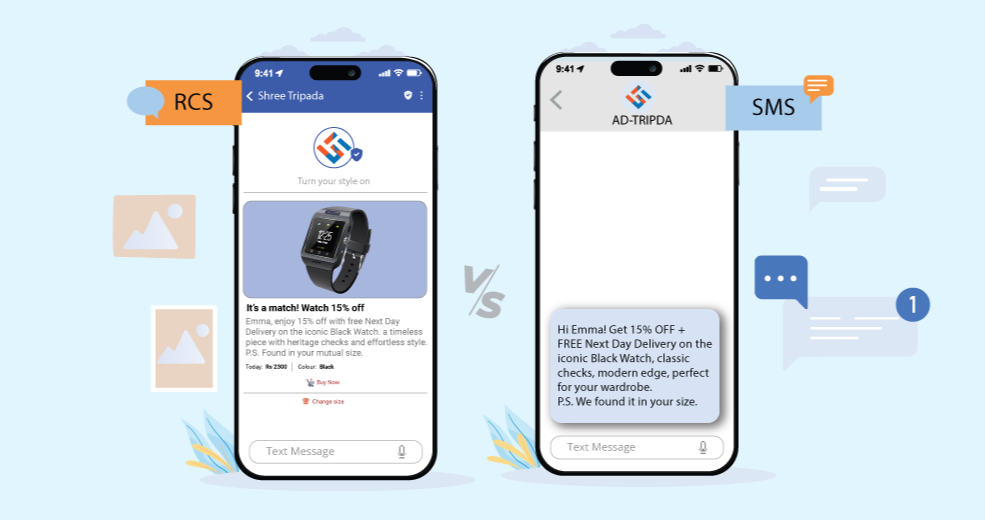
Text messages are like little notes we send on phones. There’s an old way called SMS, but now there’s a new, cooler way called RCS messages. RCS messages let you send pictures, videos, and even see when your friend is typing, making chatting more fun and easy. This helps you know why RCS messages are better than old text messages and how they can help you talk or share things better with friends or customers.
What Are SMS and RCS Messages?
SMS is like sending a little note with just words. It works on all phones and doesn’t need the internet. You can send short messages to your friends or get important messages from the bank. It’s fast and works almost everywhere.
RCS is like super cool texting that lets you send pictures, videos, and hear voice messages. You can also see when your friend is typing or if they read your message. But it needs the internet to work, and mostly works on Android phones with special apps. It makes chatting more fun and colorful!
“If you want to send bulk SMS or RCS messages at once, you can use a special service. In India, Shree Tripada is good and cheap. They send lots of messages like OTP SMS, which help keep things safe.”
Key Differences Between RCS Message and SMS
When you send a message from your phone, it can be sent as either SMS or RCS. Both help you talk to friends, but they work in different ways.
How They Are Sent- SMS sends short text messages.
- RCS sends pictures, videos, voice messages, and text.
- SMS works without the internet.
- RCS needs internet like Wi-Fi or data.
- SMS does not show when someone is typing.
- RCS shows when your friend is typing.
- SMS can’t tell if your message was read.
- RCS tells you when your friend reads your message.
- SMS messages can be only short.
- RCS lets you send longer messages.
- SMS works on almost all phones.
- RCS works mostly on Android phones with special apps.
Which Phones and Networks Work with RCS in 2025?
In 2025, many Android phones like Samsung, Google, Xiaomi, and OnePlus can use RCS messages. To use RCS, the phone needs the Google Messages app and internet like Wi-Fi or mobile data. iPhones can't use RCS yet, but maybe they will one day.
RCS is like a fun way to text. You can send pictures, videos, and see when your friend is typing or reads your message. But your phone company (like Jio, Airtel, or Vodafone) must also support RCS. If both your phone and your phone company allow it, RCS works like magic!
Pros and Cons of RCS and SMS Messages
RCS messages are like fun chats. You can send pictures, videos, voice notes, and see when your friend is typing or read your message. It feels nice and fun to talk this way! But to use RCS, you need the internet and a phone that can do it, like most Android phones.
SMS messages are the old way to text. They work on any phone, even without the internet. You can send short words or get important messages like from the bank. But with SMS, you can’t send pictures or see if your friend is typing. It’s simple, but it still works.
When to Use RCS and When to Stick with SMS
If you and your friend both have Android phones and internet, RCS is really fun to use. You can send pictures, videos, and voice messages. You can even see when your friend is typing or has read your message. It’s like a fun chat app right on your phone!
But sometimes, SMS is better. It works on any phone and doesn’t need the internet. If the internet is slow or your friend has an old phone, SMS will still send your message. Banks and important places also use SMS to send messages you need. So SMS is simple but very helpful!
Ready to Transform Your Business Communication?
Connect with your customers instantly through powerful messaging solutions. From Bulk SMS to WhatsApp automation, we help businesses communicate smarter and grow faster.