
16+ Years of Expertise
Menu
-
Services
Flagship Services
- Bulk SMS
- OTP SMS
- Transactional SMS
- Promotional SMS
- SMS API Services
Other Services
- Whatsapp Business Solutions
- Whatsapp Business API
- Chatbot & Automation
DLT Registration on Jio Trueconnect | Jio DLT

Do you want to send bulk SMS messages with Jio Trueconnect but are confused about the DLT (Distributed Ledger Technology) registration process? Don't worry, we’ve got you covered!
Why is DLT Registration Important?
DLT registration is a mandatory requirement set by TRAI to ensure that SMS messages are authentic, traceable, and fully compliant with regulations. This process protects both your business and your customers from fraudulent activities and spam messages.
To complete the Jio DLT registration process, simply navigate to the Jio Trueconnect portal, where you'll find detailed guidance on registering your business. Make sure to provide accurate and valid information during the process to avoid any complications and ensure seamless SMS delivery.
DLT Registration Process on Jio Trueconnect
Before you begin the Jio DLT registration process, it’s essential to note that there is a registration fee of ₹5,900 (inclusive of 18% GST).
Important Documents Required Before Starting the Jio DLT Registration Process
To ensure a smooth and hassle-free registration experience, make sure you have the following documents and information ready:
- Valid Business Documents (e.g., GST certificate, company registration details)
- Authorized Contact Details (email ID and phone number)
- Business PAN Card
- Consent Letter or Authorization Document (if applicable)
- Government-Issued ID Proof of the authorized person (PAN, Driving License, Voter ID, or Aadhaar Card)
Please keep in mind that the documents must be in soft copy format and should not exceed 5MB in size.
With all these documents ready, you’re good to go! Now, simply follow the step-by-step instructions provided below to complete your Jio DLT registration smoothly.
Jio DLT Registration: A Step-by-Step Guide
Entity registration
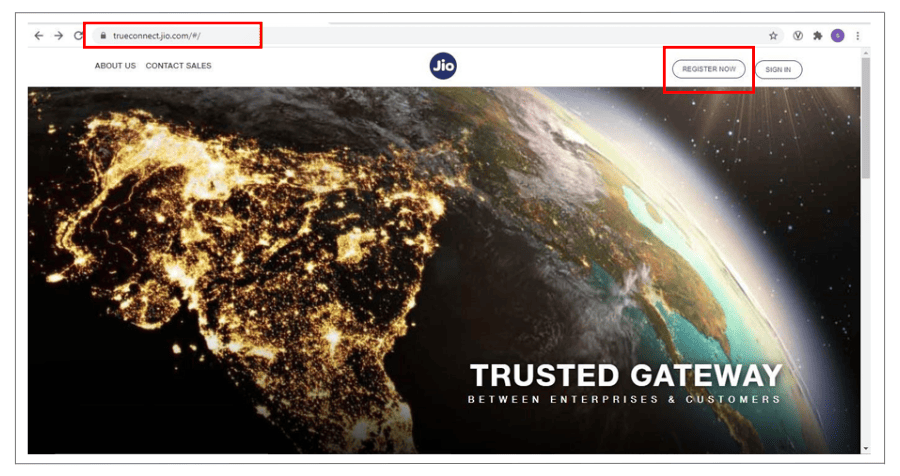
Step 1: Visit the Official Jio Trueconnect Portal- Go to https://trueconnect.jio.com/.
- Click on the ‘Register Now’ button on the homepage.
 Step 2: Choose the Principal Entity Option
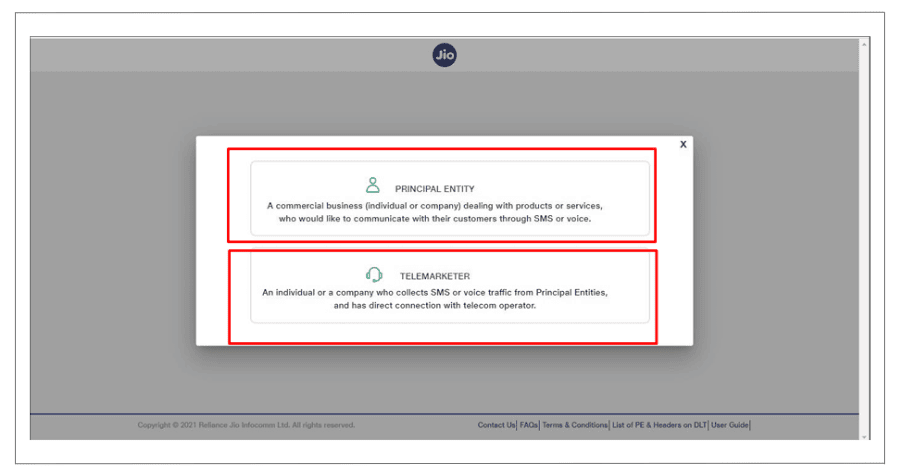
- On the registration page, select ‘Principal Entity’ from the options displayed.
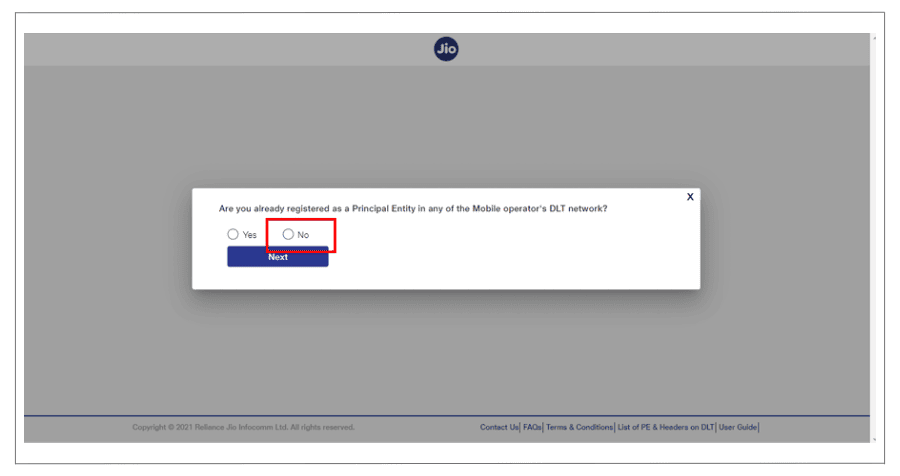
- If you're registering on the DLT platform for the first time, select ‘No’ when asked.
- Fill in all the required details accurately (e.g., Organization Overview, Organization Address, Personal Details and relevant documents).
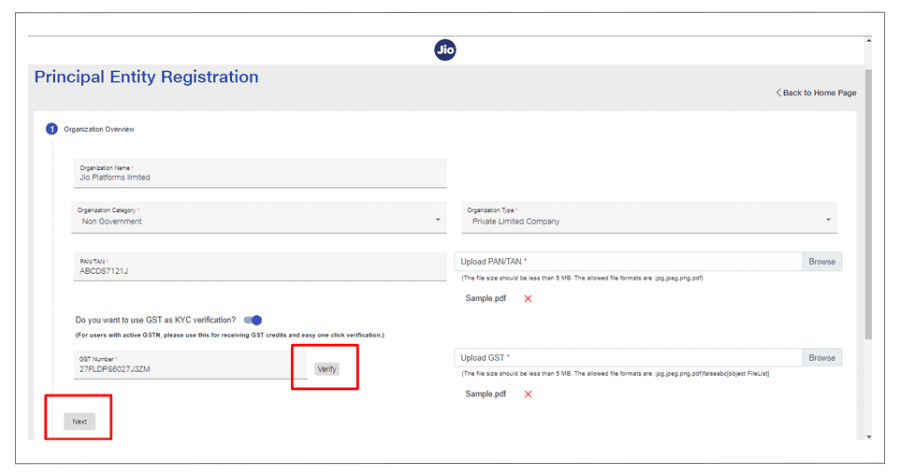 Step 3: Verify and Submit Your Details
- Double-check all the information you’ve provided to ensure accuracy.
- Click the ‘Submit’ button.
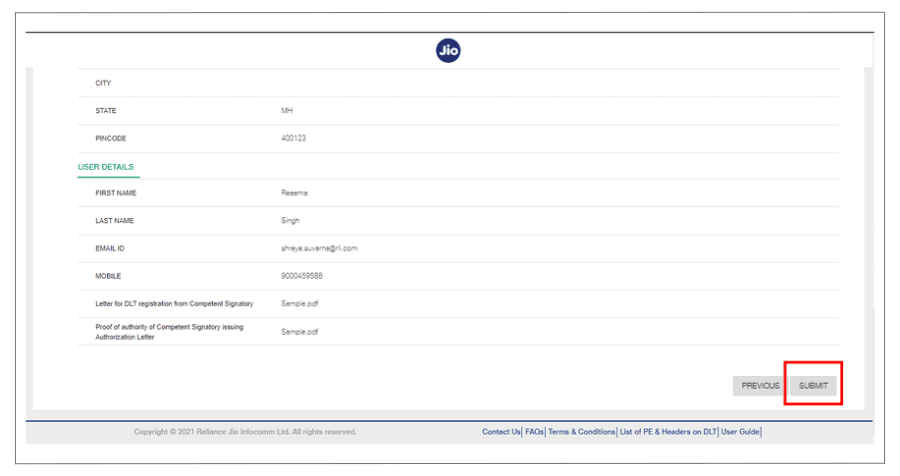 Step 4: Mobile Number Verification via OTP
- Once you click on ‘Submit’, an OTP (One-Time Password) will be sent to your registered mobile number.
- Enter the OTP in the given field to verify your mobile number.
- After submitting your registration details, you’ll receive a confirmation email from Jio stating that your Entity Registration request has been received and is being processed.
- Approval usually takes around 2-3 working days.
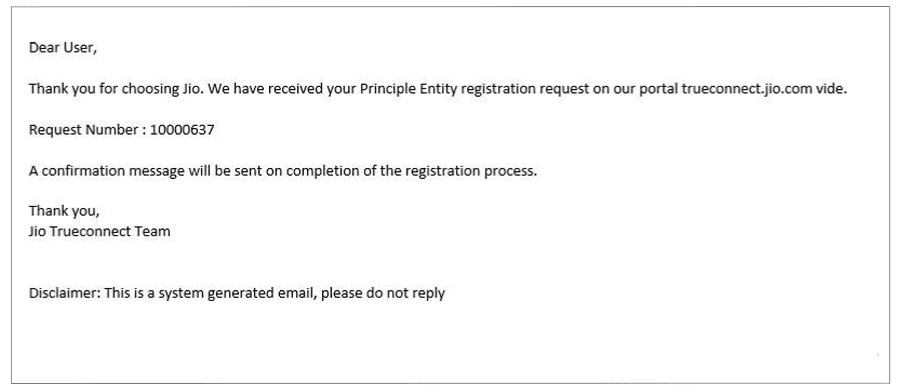 Step 6: Approval Email and Login Credentials
- Once your Entity Registration is approved, you’ll receive another email from Jio.
- This email will include your login credentials and your Entity Number.
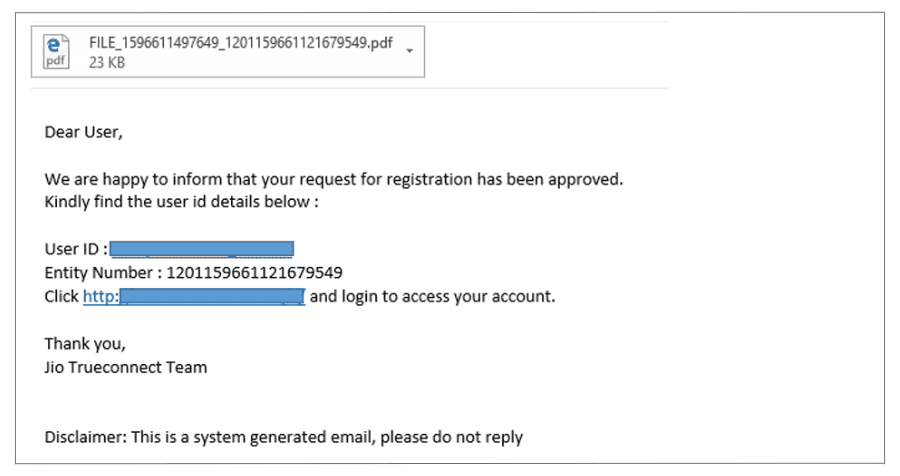 Step 7: Log in to Your Jio DLT Account
- Use the login credentials provided in the approval email to log in to your Jio DLT account.
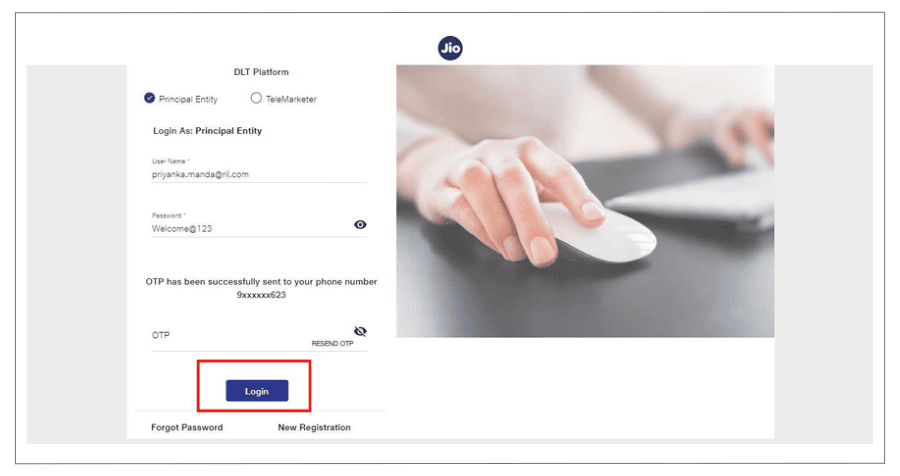
- After logging in, you’ll be directed to the dashboard page, where you can start managing your SMS campaigns and other related activities.
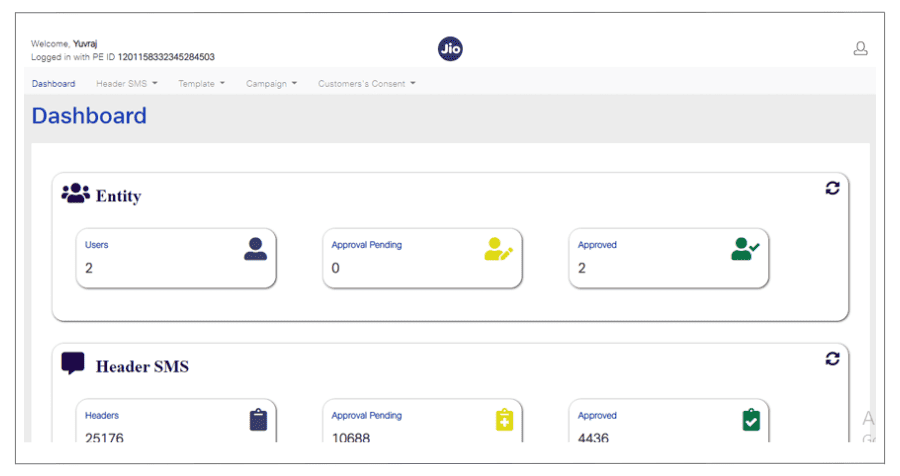
By following these steps, you can successfully complete your Jio DLT registration and gain access to the platform.
You won’t be able to send bulk SMS yet. You still need to register your Header/Sender ID on the Jio DLT portal to proceed.
How to Register Your Header (Sender ID) in the Jio DLT portal?
As an organization or primary entity, you are required to register your header (Sender ID) on the DLT platform. The Sender ID acts as your unique identity, ensuring that your clients can easily recognize your brand or business when they receive an SMS.
This step not only increases trust and transparency, but it also helps to prevent spam and develop credibility with your target audience.
Make sure to choose a clear and relevant Sender ID that represents your business accurately. Following correct DLT registration guidelines ensures smooth message delivery and compliance with TRAI regulations.
Here is a step-by-step guide to Jio header registration :
Step 1: Login to the Jio DLT Portal- Visit the Jio DLT platform and log in as a Principal Entity using the credentials you received during the Entity registration process.
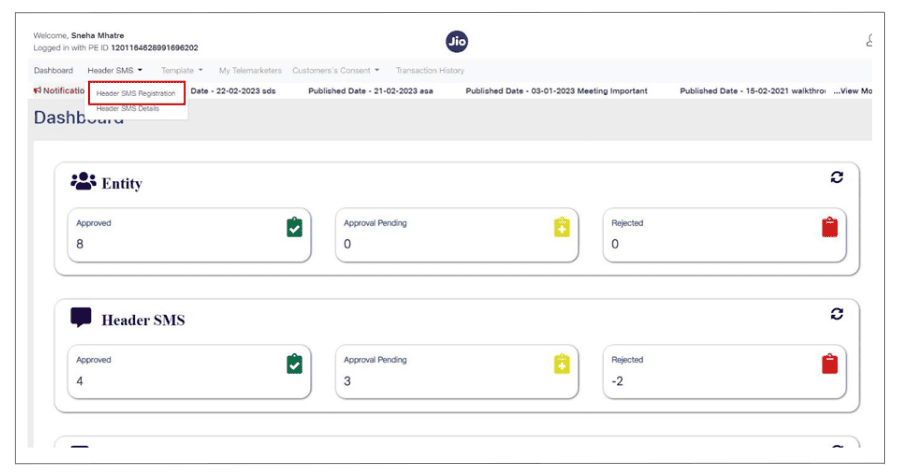
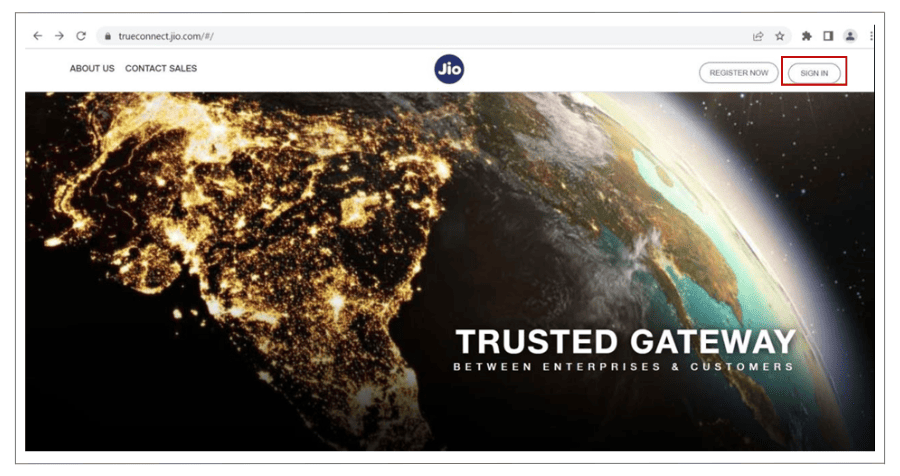 Step 2: Navigate to Header SMS Registration
- Click on ‘Header SMS’ in the dashboard.
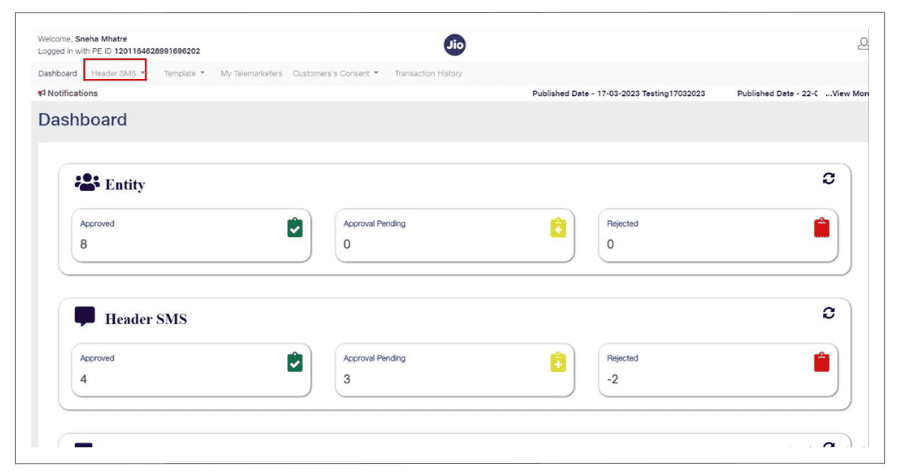
- Select ‘Header SMS Registration’ from the dropdown menu.
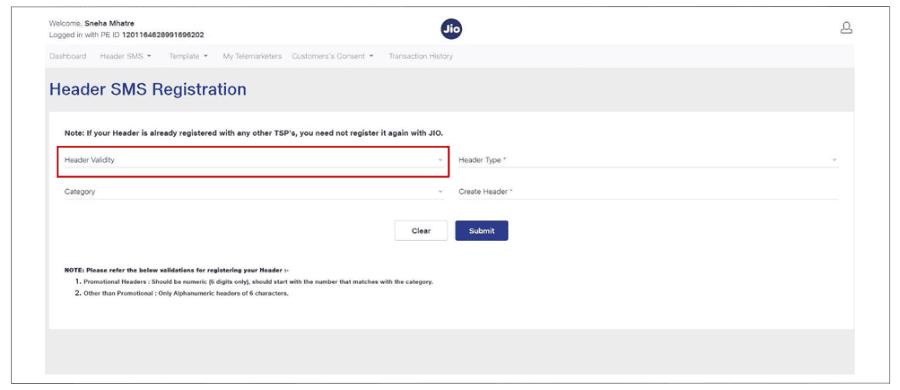
 Step 3: Fill in the Required Details
- Header Type: Choose ‘Promotional’ if you're sending marketing bulk SMS.
- Category: Select the category that best represents your business type and industry.
- Header/Sender ID: Enter the required header (Sender ID).
- Promotional headers must be a six-digit numeric code.
- The first digit will depend on your industry.
- Select a number that reflects your brand or business identity.
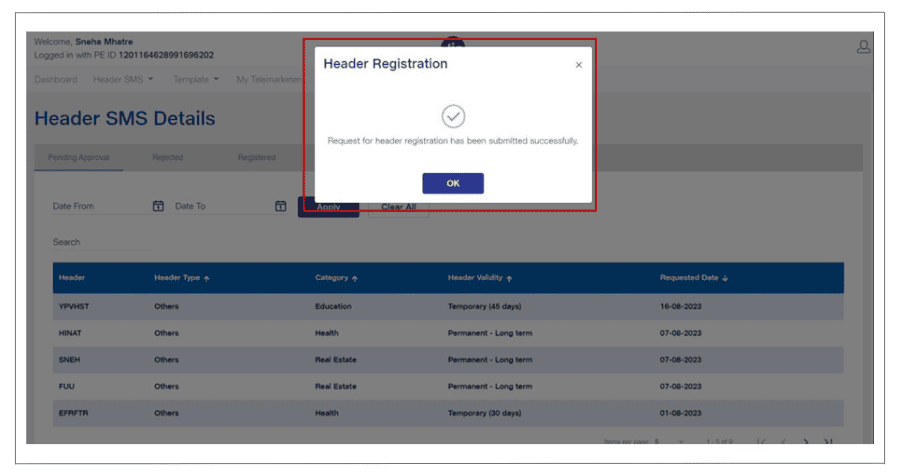
 Step 4: Submit the Details
- After entering all the details, click on ‘Submit’.
- A confirmation message will appear indicating that your Header registration is successful.
Important Notes for Jio DLT Header (Sender ID) Registration
- Alternative Header: If your desired header (Sender ID) is already registered, you will need to input an alternative six-digit header that aligns with your brand or industry.
- Approval Timeline: Header approval may take a few days to process.
- Track Approval Status: You can log in to your Jio Trueconnect DLT portal anytime to monitor the progress of your header approval request.
How do you set up a content template in the Jio DLT portal?
You must register the content template on the Jio DLT site as an enterprise.
The format of the message that will be sent to your clients is known as a content template.
- Visit the Jio Trueconnect DLT platform and log in as a Principal Entity using the credentials received during your Entity registration process.
- Click on ‘Template’ in the dashboard menu.
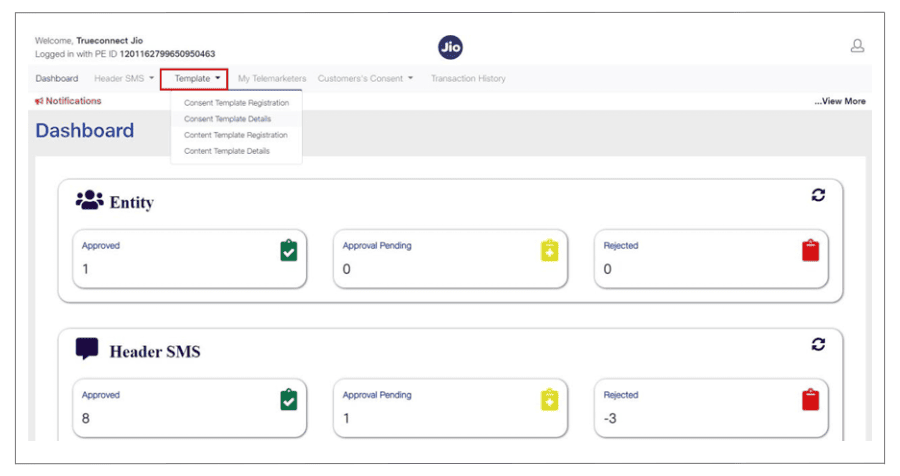
- Select ‘Content Template Registration’.
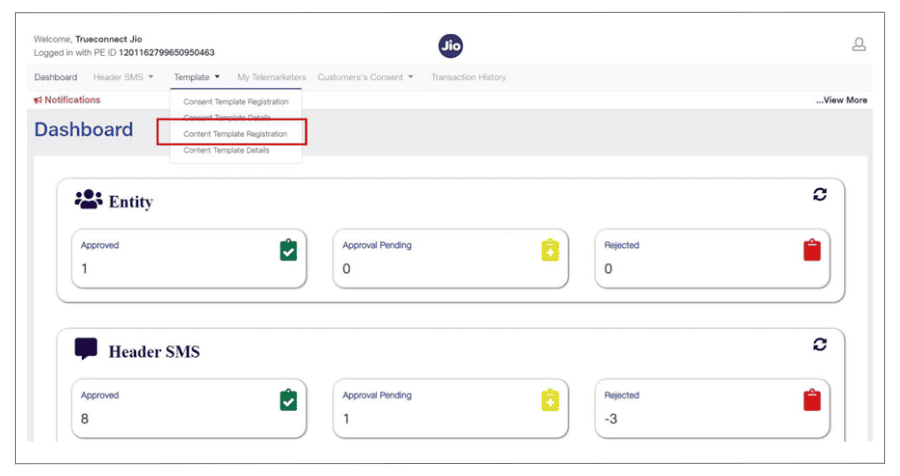 Step 3: Fill in the Required Fields:
- Template Type: Choose SMS as your template type.
- Category: Select your business niche or industry.
- Type of Communication: Choose one of the following:
- Promotional: For marketing campaigns.
- Transactional: For order updates, OTPs, etc.
- Service Implicit: For account updates, reminders, etc.
- Choose Header: Select the Header (Sender ID) you registered in the previous step.
- Content Template Name: Provide a unique name for your template (e.g., OTP SMS, Thank You SMS, Fee Reminder SMS).
- Template Content: Write the SMS message template.
- Example: "Dear {#var#}, Your OTP to login is {#var#} – YourCompanyName."
- Ensure your Entity name is included at the end of the message.
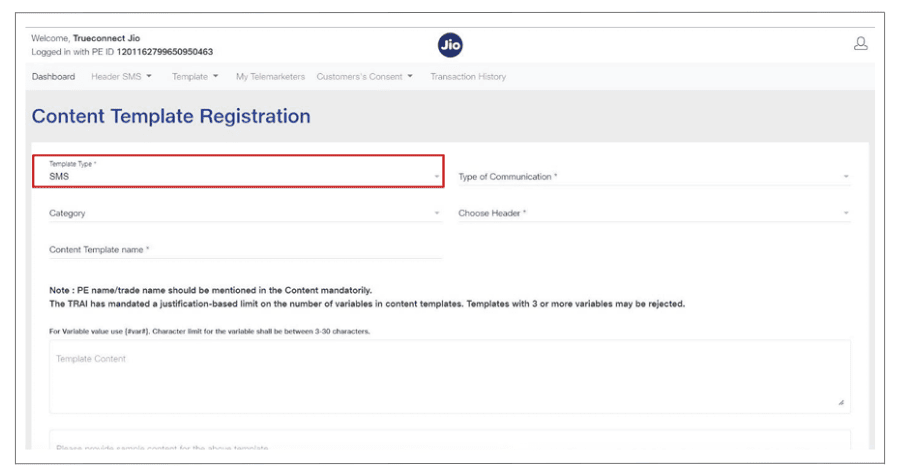 Step 4: Submit the Template:
- Click on ‘Submit’ after filling in all the details.
- Click ‘Confirm’ to finalize your content template registration.
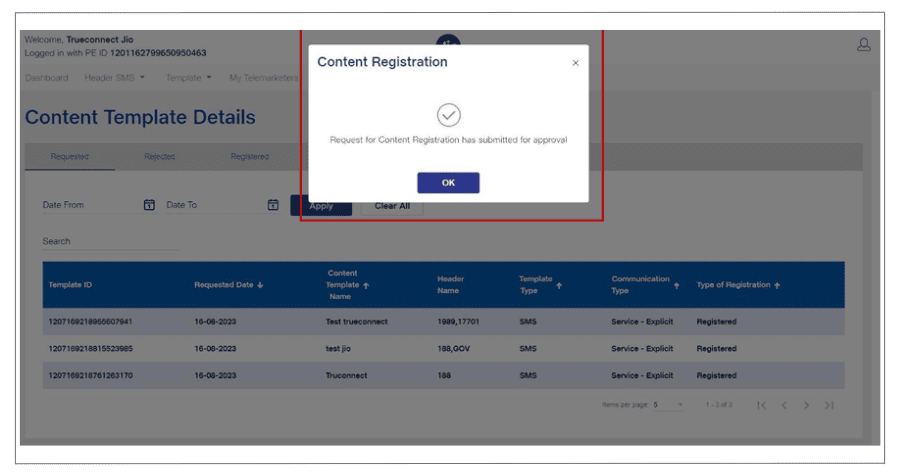 Step 5: Receive Confirmation:
- You’ll see an acknowledgment popup confirming the successful submission.
- Additionally, you will receive an email and SMS notification confirming your template submission.
Important Notes for set up content template
- Use {#var#} to define variable fields in your SMS content template. Every variable must have a character limit of 0–30. You can divide your variable into two distinct variables, as {#var#}{#var#}, if it goes beyond this limit.
- Jio may take 24 to 48 hours to approve your content template after you submit it. You can see your registered templates under Template → Content Template Details → Registered once they have been approved.
- Make sure to include your Entity ID, Approved Header (Sender ID), Template Name, and Template ID in the API configuration for a successful SMS service integration. For SMS distribution to go well, accurate integration is necessary.
We hope you have found this information useful!
Please be aware that telecom providers oversee and TRAI regulates the DLT process. We advise contacting them directly if you have any complaints, issues, or comments.
That said, we're always here to assist you in every way possible to ensure a smooth experience!
Check other related DLT articles:
Ready to Transform Your Business Communication?
Connect with your customers instantly through powerful messaging solutions. From Bulk SMS to WhatsApp automation, we help businesses communicate smarter and grow faster.